Showing posts with label Engagement. Show all posts

Wednesday, May 31, 2017

8 Ways for Students to Reflect on Their Learning


How do we know our students are truly learning? Teachers often use tests and essays to gauge student achievement. And although these methods are useful ways to measure student performance, they place most of the responsibility of analysis on the teacher. What if students were also involved in actively analyzing their mastery?

In my classroom, student reflection is regularly woven into each unit of study throughout the year. Below are eight ways I’ve found to encourage and promote this very important cognitive skill.

1. Blogging
All my student have their own blog, and in addition to writing on topics of their choosing, I often also ask them to write about what they’ve learned from  a lesson I’ve taught. My prompt usually includes variations of the following questions: After studying this unit, what conclusions can you draw? What do you think of the ideas and skills we covered during our lesson? What do you think about what you learned? Did you find these lessons meaningful or valuable? Why or why not? To learn more about incorporating student blogs into your teaching, check out my post “How to Inspire a New Generation of Writers Through Blogging.”

2. Websites
All my students also have their own website, which is  a great way to showcase the projects they’ve worked on in my class. For each assignment they add to their site, I ask them to write a short paragraph of explanation and reflection. Because I teach in a G Suite for Education district, my students use Google Sites, but there are also many beautiful website builders like Wix and Weebly that students might find equally easy to use.

3. Padlet
I love Padlet, a virtual bulletin board where students can share ideas and crowdsource information. If building a website seems a bit daunting, then Padlet is a great alternative — it’s very easy to use. Students can post their projects on a Padlet and reflect on what they’ve learned.

4. Google Slides
Google Slides is not just a tool for creating presentations, it can also be used as a digital book. Think of each slide as a page in a book, and you get the idea. Students can upload or import each assignment into a separate slide, and write a short explanation for each one. With lots of fonts, colors and layouts to choose from, a reflective paragraph never looked so pretty.

5. Google Forms
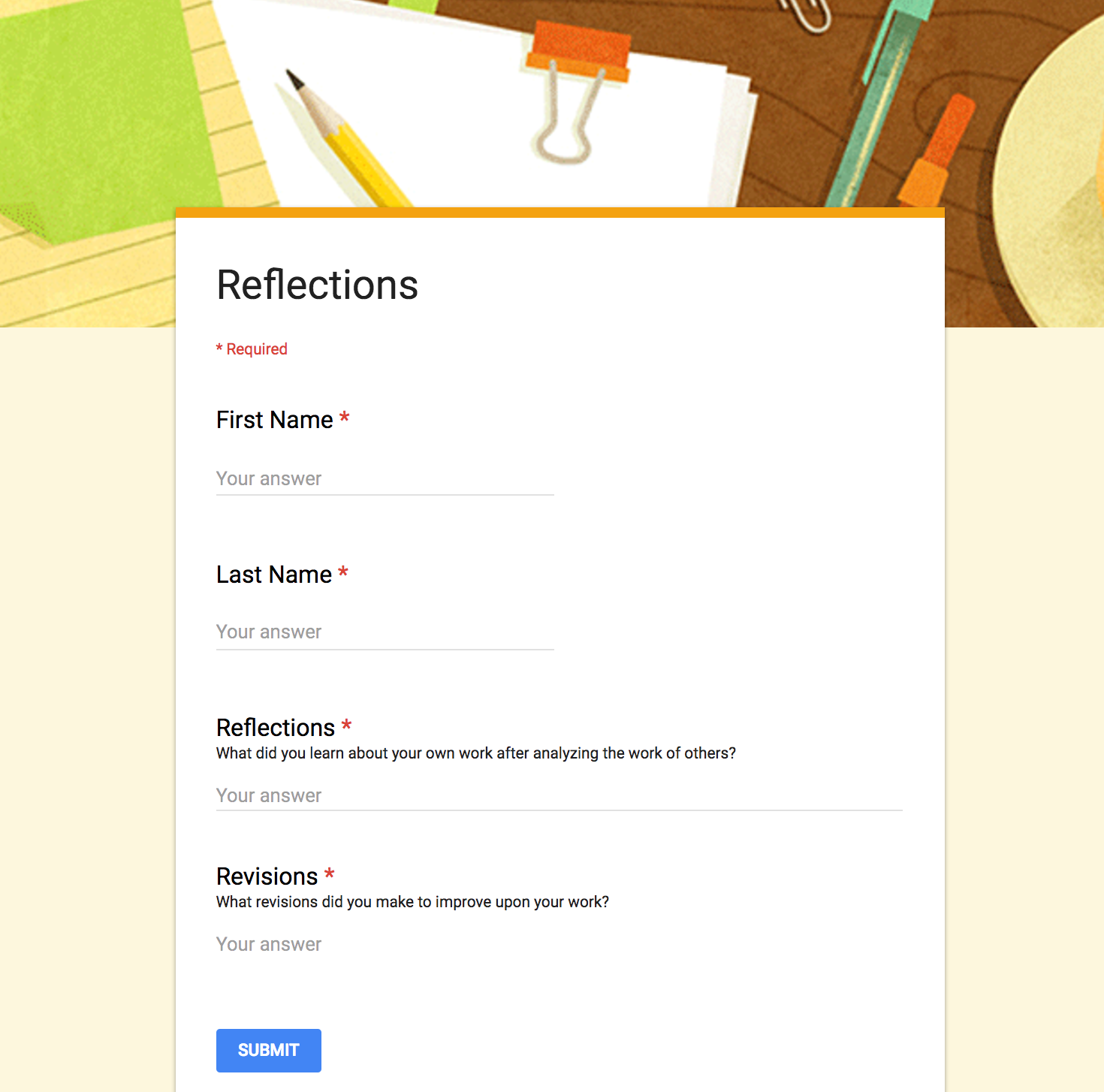
What better way to keep things quick and simple than by collecting reflective responses in a Google Form? I love that Google Forms populates all responses into one spreadsheet. No need to click on 175 different files to read 175 paragraphs. You can also use the same form throughout the year to have students reflect on different assignments, since all responses are timestamped. Below is an example of a form I use in my class for this purpose.


6. Google Classroom
When I want my students to write a short paragraph, I often turn to Google Classroom. Using its “Create Question” feature, I can quickly ask my students a reflective question, and they can post their replies. I can also decide if I want their answers to be viewable by only me, or if I want them to read and respond to each other’s ideas. What better way to promote reflection than to have students interact and evaluate each other’s responses?

7. Screencasts
Not only is screencasting a fantastic tool for reflection, it promotes fluency skills as well. Students can open a digital assignment on their computer and record themselves talking about what they’ve learned from the lesson as they show the project on their screen. Some popular screencasting tools include Screencastify, QuickTime, Explain Everything and PowerPoint 2016. This list includes both free and paid software. Some are Web-based or specific to Mac, iOS or Windows platforms.

8. Student-Designed Assessments
Since last year, I have given my students the option of designing their own assessments. I first ask them to consider what skills and content they learned from a particular unit. For example, after reading Martin Luther King, Jr.’s “I Have a Dream” and Dolores Huerta’s “Proclamation of the Delano Grape Workers for International Boycott Day,” I asked them to reflect (in small groups) on their takeaways from the lesson. They replied: “We learned many rhetorical strategies and how they help make a speech powerful and convincing.” They also realized that “words are as powerful as actions,” and “problems can also be solved without violence.” After pinpointing the goals of the lesson, we craft a rubric together to identify the criteria that will be used to evaluate their assessment. Students have fun working on this project, and I love seeing their creativity.

A Reflective Classroom
As a teacher, I want my students to become independent learners and critical thinkers. I truly believe that in order to learn, one has to be reflective. If you have found ways to encourage reflection in your students, please share your thoughts in the comments below.

Originally published on KQED's "In the Classroom" blog. Reproduced courtesy of KQED.

Monday, April 25, 2016

Maximize Learning with Digital Tools: Moving from Consumption to Creation

“Students as Creators” © 2016 Alice Chen | All Rights Reserved
We are starting to see them pop up more frequently in U.S. classrooms: the iPads, the Chromebooks, and the laptops. As more schools move toward using technology in the classroom, we are faced with the question of how to use these devices effectively in our instruction.

Undoubtedly, it's an exciting time to be an educator. We are no longer limited to just using textbooks or curriculum guides. The number of apps and websites available to us has exploded exponentially in the online educational space. Students are using math apps to brush up on much-needed skills. They can watch science videos that bring concepts to life. With social media, they are able to access the latest news within minutes of the occurrence of an event. However, is that all we wish our students to be able to do, to only become consumers of information?

I believe that students should be using technology to its fullest potential in the classroom. This means that not only should students be using it to access the wealth of information on the Internet but that they also should be using digital tools to create meaningful content from what they have consumed.

Cross-Curricular Integration
Though I teach English Language Arts, I believe in integrating other academic content whenever possible. I always try to provide a scientific or historical perspective when the lesson lends itself, and PBS LearningMedia is perfect for this purpose. This fantastic and free online platform has over 100,000 resources available that covers topics from all content areas and grade levels.

For example, my students just finished reading a wide selection of speeches for our rhetoric unit. We studied various speeches for their beauty of language, persuasive elements, and powerful message. One of my favorite speeches from this unit is Martin Luther King, Jr.’s “I Have a Dream.” I want this speech to come to life for my students and for them to also appreciate the historical significance of this time period. Below is my approach to teaching this piece by leveraging digital media resources and Google Drawings.

Lesson Plan for “I Have a Dream”
  1. Introduce the Civil Right Movement by showing students these media pieces: "The Legacy of the Gettysburg Address" and "Civil Rights and the 1950s | Crash Course US History #39".
  2. Students read "I Have a Dream" in groups, stopping to discuss each paragraph and the rhetorical strategies Dr. King used.
  3. Divide the speech into different sections and have each group create a Padlet to demonstrate their understanding of this piece. Each group must include the following components: a quoted passage, an explanation of the quote, two analysis of the rhetorical strategies used, and proper attribution for any media they included. Here is an example that my students created.
  4. Based on the information from the three historical documents above, students create a 21st century flyer advertising the event. Below is an example of one group’s work on this project.

“Digital Flyer” © 2016 Anisha & Jake | All Rights Reserved
Using Digital Tools for Authentic Assessment
Instead of giving my students a traditional test to assess their comprehension of the significance of the speech and the historical documents they examined, I prefer to have my students express their understanding by creating an authentic product. Because I’m constantly trying to cultivate my students’ creativity and critical thinking skills by emulating the “real world” as much as possible, I also emphasize the importance of artistic design when creating a project. I find that this last step is often overlooked in our instruction. However, in life, how an idea is presented is just as important as the idea itself, and I want my students to realize this.

Let’s Get Them Creating
My students used Padlet and Google Drawings for this particular lesson, but there are also a plethora of other digital tools that students can use to foster their creativity. Below is a list of digital creation tools that are great for the classroom. It is no means an exhaustive list, but many students find them fun and easy-to-use.
  1. Thinglink makes images and videos interactive
  2. Canva is easy to use design software with templates for infographics, posters, and more
  3. Storybird is a beautiful app that inspires writing with art
  4. Powtoon makes creating animated presentations full of awesome
  5. Zoodle Comics a comic strip app for the iPad
  6. Sock Puppets if you love sock puppets…
  7. Video editing tools (i.e. YouTube Editor, WeVideo)
  8. Screencasting tools (i.e. Snagit, Screencast-O-Matic, Screencastify, Movenote, Explain Everything)
Which digital tools do your students like to use to show what they know? Please share in the comments below.

Originally published on KQED's "In the Classroom" blog. Reproduced courtesy of KQED.

Saturday, January 9, 2016

10 Ways to Use Google Hangouts to Transform Learning

My class "hanging out" with Education Secretary Duncan on Google Hangouts
In our world today, we can stay connected in unprecedented ways. Why just call or text when you can “see” someone who is hundreds or thousands of miles away? Even President Obama used Google Hangouts in 2013 during his fireside chat with the country. If you haven’t used Hangouts before, it’s time to examine the possibilities.

In education, using Hangouts is a great way to connect and collaborate with other educators without giving out your phone number. It’s a powerful tool for making connections, working collaboratively, and introducing the world to your students. Many educators have embraced Hangouts to enrich both their students’ learning experiences and their own professional development. Below are some ways educators are using Hangouts to step up the learning.

Make Student Connections
You can connect students with their peers from around the country, or even from abroad if time zone differences permit. Below are some ideas on how teachers are using this fabulous video calling tool in their classrooms.
  1. Book Talks: Classes that are reading the same book or similar genres can discuss novels together and make book recommendations to one another.
  2. Mystery Hangouts: In this activity, two classrooms video chat with each other but do not reveal their individual locations. Before meeting online, both classes research facts about their own state and create clues about their location. Then, each class takes turns asking “Yes” or “No” type questions in a race to solve the mystery. More details on how to get started could be found on my blog here. To find classes to connect with yours, visit the Mystery Location Calls Google+ Community or reach out to members of the Connected Classrooms Workshop Google+ Community.
  3. Presentations: Give students an authentic audience. They can present their projects to other classes or adults. Recruit parents, community members, or career professionals to provide a captive audience for your students.
  4. Project Collaboration: Classes that are studying similar themes or topics can collaborate on a project together in a way never possible before.

Bring in the Experts...For Free!
  1. Guest Speakers: Inviting a speaker into the classroom has never been easier...or cheaper. Video calling enables anyone from around the world to “visit” a school. Also, as an added plus, Google Hangouts has the ability to handle up to ten people in a video call at once and up to fifteen using a Google Apps account. This means that there’s never a dull moment or radio silence during the call. Last year, my classes were able to participate in two amazing Hangouts on Air. We got to speak with Nobel Peace Laureate Leymah Gbowee and Education Secretary Duncan.
  2. Virtual Field Trips: With video calling technology becoming more popular, many companies are now offering virtual field trips via Hangouts on Air, which is a public Google Hangout that broadcasts a live recording of the event. After the video call ends, it is archived on the host’s YouTube channel for anyone to view again later. Here are a few companies that are offering or (have recently offered) virtual field trips that could bring that out of classroom experience to your students: Learn Around the World, Exploring by the Seat of Your Pants, and SeaTrek.TV. Occasionally, announcements of virtual field trips from various members of the Connected Classrooms Workshop Google+ Community will be posted.

Learn and Collaborate from Anywhere
  1. Virtual Classes: One year, we had one student at my middle school who progressed so quickly through his math studies that he was ready for Algebra II. Unfortunately, we didn’t offer this course on our campus, but we did at another school in our district. Thanks to Google Hangouts, this student didn’t have to transfer schools and, instead, he attended math class virtually and received all his instruction online.
  2. Office Hours: Sometimes students need more one-on-one attention or perhaps they were absent and need to catch up on what they missed. Teachers can schedule Hangouts to hold virtual office hours to provide the assistance students need.
  3. Professional Collaborations: With everyone just a video call away, educators can work on projects and share ideas with anyone around the world. Many educators have forged powerful connections (called PLNs) via social media platforms like Twitter and Google+, and they’re using Google Hangouts to learn together or to plan professional development events for educators like Edcamps and PLAYDATEs.
  4. New Twist to Webinars: More and more, companies are turning to Hangouts on Air to host their webinars. It gives educators a choice: watch the webinar live and participate in a “Question & Answer” session with the presenter or watch it later at one’s convenience. A great example of this is the webinar series from Imagine Easy Solutions.

The possibilities of using Hangouts in education are endless. How will you transform your learning and the learning of your students?

Abbreviated version of this post was originally published on WeAreTeachers.

Sunday, March 1, 2015

The 9 C's of Digital Literacy


Today, at my keynote for the California League of Schools Annual Conference North, I will be discussing what I perceive to be the 9 C's of Digital Literacy and how to integrate these skills in a Common Core classroom.

We all know that our digital natives are very at ease with technology. In fact, they’re in love with it, but does that automatically make them digital proficient?

When I originally pondered this question, I began to realize that the 5 C's often discussed in education today - communication, collaboration, creativity, critical thinking, and citizenship - needed to be expanded to include these other areas as well: curation, copyright, character and connectedness. I believe that these digital literacy skills are essential for success in today's modern world. It’s more important than ever for educators to teach students how to become digitally literate so that they will be successful in their lives and careers.

To share the "9 C's of Digital Literacy" on Twitter, click here. To download a PDF copy, click here.

Monday, January 19, 2015

Beyond the Textbook: Virtual Field Trips for Science & Social Studies

"WP 35, SDr9776" by Stefan Dressler / CC BY-SA 2.5 
Have you ever wanted to take your students on a field trip around the world? What if they could visit the deserts and grasslands of Africa for free? Would you jump at the opportunity? On February 5, 2015 at 12pm Eastern Time, this opportunity will become a reality for your students.

Join +The Nature Conservancy's Charles Oluchina and science teacher Tyler DeWitt as they host this wonderful learning opportunity for students using Google’s Hangouts on Air. This 40 minute live broadcast, "Take a Virtual Field Trip to the Deserts and Grasslands of Africa," will transport your students to Burkina Faso to learn how one African farmer solved the challenges of desertifcation before heading to Kenya to learn the benefits of ecotourism and how grasslands are vital to the sustainability of the earth. Then, teachers will be able to extend the learning for their students through a first peek at +PBS LearningMedia's fabulous online collection of videos, interactive games, and lesson plans from the new PBS series EARTH A New Wild.

To sign up for this unique event, register at the Nature Works Everywhere website by clicking here.

Classes can watch the live virtual field trip or the archived copy by visiting The Nature Conservancy’s YouTube channel. This virtual field trip is the first in a series of future broadcasts that will examine the interconnectedness of people and nature. This program is designed for students in the third through eighth grades.

Through this program, students will gain a greater awareness and appreciation of the following key concepts:

  • Working with nature so nature works with us
  • People and Conservation
  • Desertification
  • Smart Development
  • Ecotourism
  • Habitat
  • Grasslands
  • Reforestation
  • Land preservation

+Nature Works Everywhere also have fabulous lesson resources for science, geography, and social studies classes. Some examples of what you can find on the Nature Works Everywhere website are listed below:

The Nature Conservancy is a non-profit organization that is dedicated to preserving the beauty of our natural world. That is why they created Nature Works Everywhere “to help students learn the science behind how nature works for us -- and how we can help keep it running strong.”

The partnership between us and nature has never been as important as it is now. Do your students understand where we belong in this fragile relationship? Let’s bring this lesson to life for them and help them become our future changemakers!

This blog post is sponsored by We Are Teachers.